
************ DELBOY'S RADIO BLOG - DELBOY'S RADIO BLOG - DELBOY'S RADIO BLOG - DELBOY'S RADIO BLOG ************
13 February 2017


12 February 2017
New TYT MD-2017 Dual Band DMR Handheld?
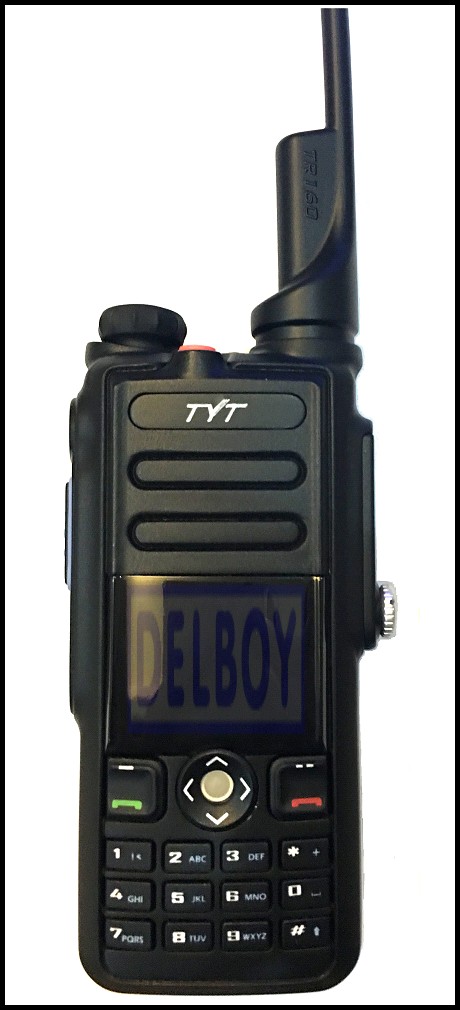
If the internet rumours are to be believed this radio is expected to be on sale soon, the new TYT MD-2017 dual band DMR handheld:
FEATURES:
Dual band
Dual display
Dual standby
Complies with ETSI TS 102 360-1, -2, -3
Uses Time Division Multiple Access (TDMA)
Compatible with MotoTRBO Tier 1 and II
GPS capable
Lone worker function
Encryption function
Analog and Digital Modes
Single Call, Group Call and All Call
Remote Kill/Stun/Activate
IP67 Waterproof
Firmware upgradeable

This could be the DMR handheld that people have been waiting for....!
Price - TBA
10 February 2017
Baofeng Exploding Batteries?

Following on from a previous post on the Blog about Baofeng chargers which were prone to overheating (LINK) I noticed this warning from Phillip Clark on Facebook:
"Safety warning!! BAOFENG
OK so I know some of you probably have some of these radios and some of you won't but I'll just warn you of my experience and you make up your own mind as to what you do with them lol.
I will start by saying that over the last 7-8 years I've used many of their radios and never had a problem. Value for money and performance is just great for what they are! So I bought two of the newer versions of the Baofeng UV-5R PLUS.
Initially no issues when I bought them a few months ago, worked well and again awesome value for money.....
So late Wednesday evening I placed my radio as usual into its charging pod and nothing out of the ordinary happened. It indicated a red LED stating it was charging and when it turns green its charged and the charging process is cut off. I was then horrified when a massive explosion was heard and a literal 7 to 8 foot flame like a firework was shooting out from the radio!! I then smothered the lot instantly and threw the burning battery out of the window!

( Injuries were sustained from removing the battery from the floor and throwing it out the window)
This was the last concern on my mind because I know I needed to get it outside before it blows again. Sure enough about 5 mins of it sitting outside it blew up again only this time much more violently.
It's made a hell of a mess of my carpet, the radio and everything around it. From looking at it closer it appears that it was charging fine then the battery failed and literally blew off the back of the radio across the room where it landed on my carpet. You often hear about stuff like this on Facebook or TV etc. You never think it'll happen to you. Anyways I'm just giving you all the heads up and have messaged Baofeng directly to. JUST BE CAREFUL. This could of easily of been worse if I hadn't of reacted the way I did. Here are some pics of the type of radio it was and what's left!" - Phillip Clark on Facebook.
Photos of the radio:

(Click To Enlarge)
Of course this is not a problem that is just associated with Baofeng, many other manufacturers have had problems with Lithium batteries even the giant tech company Samsung had well publicised problems with their smartphone batteries. The main thing is that you should not charge radios, phones and other items when you are not in sight of the charging process. You certainly should not charge anything while you are sleeping or out of the house.
8 February 2017
4 February 2017
HF Pedestrian Mobile in the Hills
Video:YouTube/M0DAD
Some more hardcore portable action from David, M0DAD!
1 February 2017
Martin Lynch "Denial Of Service" attack!

Martin Lynch & Sons suffered a 'Denial of Service' attack over the weekend and many potential customers found it impossible to reach their website.
By way of an apology they are offering a £20 voucher to anyone who spends more than £250 until 28th February 2017.
All you have to do is make a purchase of over £250 (Before shipping costs are added) and enter code "MLS20" when asked.
Considering that it wasn't really their fault I think this is a good gesture.
Uniden Bearcat UBC-D3600XLT @ Nevada

Nevada now have the new Uniden Bearcat UBC-D3600XLT Analogue/Digital scanner in stock. Priced at £425 it boasts a whole heap of features:
Features, Functions & Specifications :-
Favorites Scan
Allows you to organize your Systems into Favorites Lists. The scanner will scan multiple Favorites Lists and Full Database at the same time.
4 GB microSD card (provided - 1 GB up to 32 GB supported)
For storing Favorites Lists, Profiles, all settings, Discovery sessions, recording sessions.
Location Based Scanning
Connect to a GPS receiver (not included) for precise system selection and continuing reselection when you travel. The scanner can automatically Avoid and Unavoid Systems and Departments based on your current location as provided by an external GPS unit.
Range Control
Lets you set how far out from your current location the scanner will search for channels in Favorites Lists. Location precision for departments and sites that allows you to define a location and range using rectangles instead just of a single circle.
Trunk Tracker V Operation
Scans APCO 25 Phase 1 and Phase 2, DMR, Motorola, EDACS, EDACS ProVoice, and LTR trunked systems, as well as conventional analog and P25 digital channels.
Multi-Site Trunking
Lets you program the scanner to share trunked system IDs across multiple sites without duplicating IDs.
Control Channel Only Scanning
With Motorola trunking frequencies, you do not have to program voice channel frequencies.
Instant Replay
Plays back up to 240 seconds (4 minutes) of the most recent transmissions.
Audio Recording
Capture transmissions for later playback.
Custom Alerts
You can program your scanner to alert when you receive, a Channel or Unit ID, a Close Call hit, an ID is transmitted with an Emergency Alert, or a Tone-out hit. For each alert in the scanner, you can select from 9 different tone patterns, 15 volume settings, 7 colors, and 2 flash patterns.
Multicolor LED Alert
The alert LED with 7 colours, Blue, Red, Magenta, Green, Cyan, Yellow, or White, can be used with your Custom Alerts.
Trunking Discovery
Monitors system traffic on a trunked radio system to find unknown IDs and automatically records audio from and logs new channels for later review and identification.
Conventional Discovery
Searches a range of frequencies to find unknown frequencies and automatically records audio from and logs new channels for later review and identification.
Scan by Service Types
Scan your channels by Service Type i.e. Fire, Police, Railroad, etc.
Search Speed
80 step/sec. (typical) in Search mode (max) except for 5 kHz steps. 250 step/sec. (typical) in Search mode (max) ? (Turbo Search) for 5 kHz steps.
Multi-Level Display and Keypad light
Makes the display and keypad easy to see in dim light with three light levels.
Temporary or Permanent Avoid
For Systems/Sites/Departments/Channels.
System/Channel Number Tagging
Number tags allow you to quickly navigate to a specific Favorites List, System, or Channel.
Start-up Configuration
You can program each of your Favorites Lists with a Startup Key (0-9) so that when you power up the scanner and press the key number, just those Favorites Lists assigned to the key will be enabled for scan.
Close Call© RF Capture Technology
Lets you set the scanner so it detects and provides information about nearby radio transmissions. Close Call Do-not-Disturb checks for Close Call activity in between channel reception so active channels are not interrupted.
Broadcast Screen
Allows the scanner to ignore hits in search and Close Call modes. You can also program up to 10 custom frequency ranges that the scanner will ignore.
Fire Tone-Out Standby/Tone Search
Lets you set the scanner to alert you if a two-tone sequential page is transmitted. You can set up to 32 Tone-Outs. The scanner will also search and display unknown tones.
PC Programming
Use the Sentinel software to manage your scanners Profiles, Favorites Lists, and firmware updates.
Analogue and Digital AGC
Helps automatically balance the volume level between different radio systems.
Priority/Priority w/DND Scan
Priority channels let you keep track of activity on your most important channels while monitoring other channels for transmissions.
Priority ID Scan
Allows you to set priority to talkgroup IDs.
Intermediate Frequency Exchange
Changes the IF used for a selected channel/frequency to help avoid image and other mixer-product interference on a frequency.
Individual Channel Volume Offset
Allows you to adjust the volume offset for each channel.
Configurable Band Defaults
Allows you to set the step (5, 6.25, 7.5, 8.33, 10, 12.5,15, 20, 25, 50 or 100 kHz) and modulation (AM, FM, NFM, WFM, or FMB) for 31 different bands.
Adjustable Scan/Search Delay/Resume
Set a delay up to 30 seconds or a forced resume up to 10 seconds for each channel or search.
Data Naming
Allows you to name each Favorites List, System, Site, Department, Channel, ID, Location and Custom Search, using up to 64 characters.
Duplicate Input Alert
Alerts you if you try to enter a duplicate name or frequency already stored in the scanner.
100 Quick Keys
You can scan Favorites Lists, Systems, and Departments by assigning them to quick keys.
Search Avoids
You can temporarily Avoid up to 250 frequencies and permanently
Avoid up to 250 frequencies in any Search mode or Close Call mode.
10 Custom Searches
Lets you program up to 10 custom search ranges.
Search with Scan Operation
Lets you include Custom Search ranges during scan operation.
3 Search Keys
You can assign 3 of the number keys to start a Custom Search, Tone-Out Search, or Close Call Search.
Quick Search
Lets you enter a frequency and start searching.
Built-in Battery Charger
Allows you to charge the batteries in the scanner.

Nevada Website: CLICK HERE
Subscribe to:
Posts (Atom)